
Every Scene. Every Screen. Always Live.
Desktop and mobile, built as two separate productions and sent over one upload. DualStream Relay keeps every channel live, start to finish.
Free to use. No card required, just an account.
Meet DualStream.
Built by streamers, for streamers. Every feature earns its place.

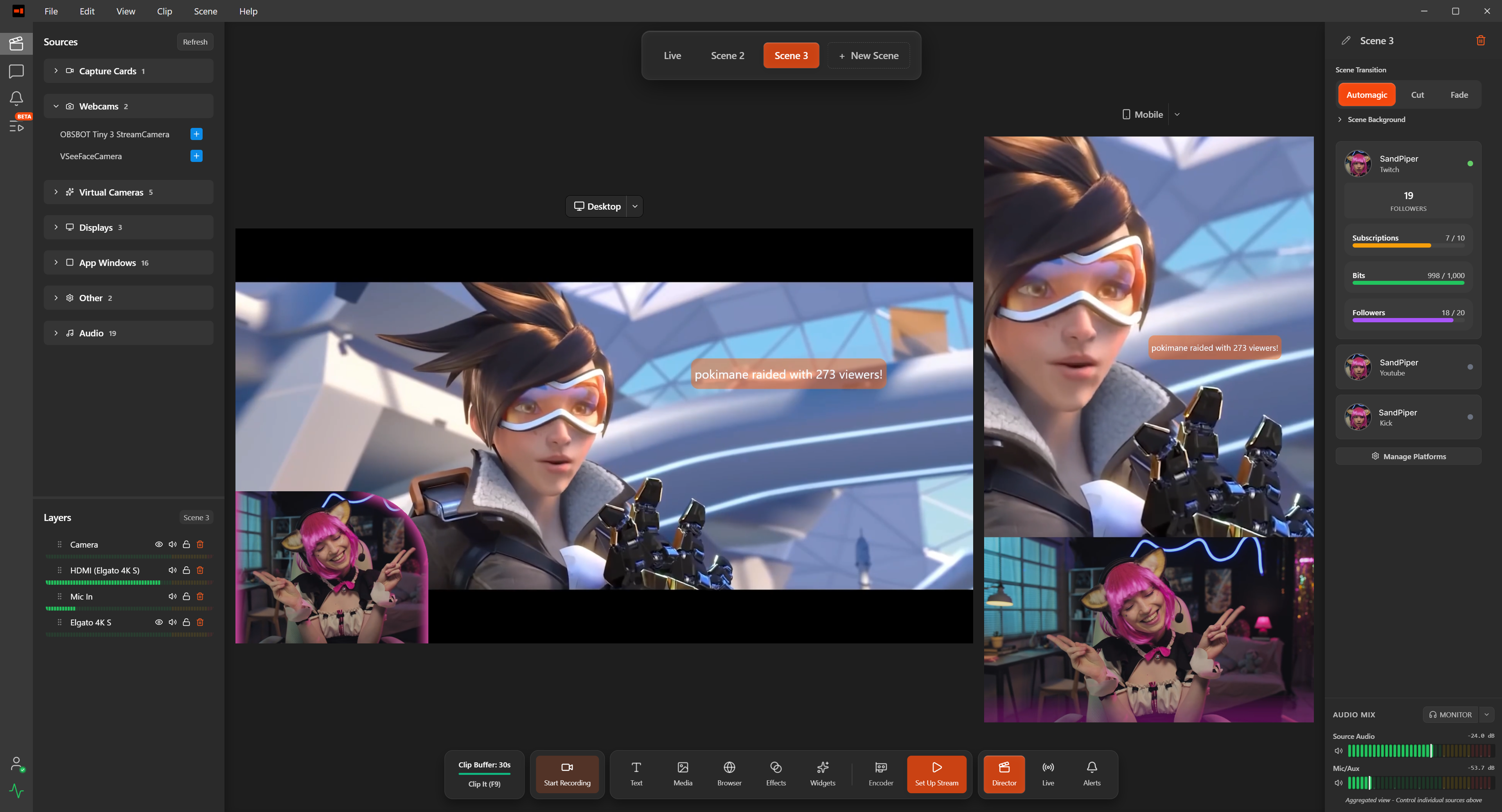
Dual-Scene Compositor
Independent layouts for desktop and mobile. Position sources differently for each format. Real-time editing with instant preview.
Stream everything free. Subscribe to reach every platform at once.
Download DualStream free and go live on Desktop and Mobile at the same time, straight from your machine to your platforms. No credit card. Premium sends one upload instead, reaches every platform at once, and holds them all live if your connection drops.
Test Drive
The whole studio, free. Build your scenes and go live on Desktop and Mobile at the same time, direct from your machine to your platforms.
Free forever · No payment required
- Go live on Desktop and Mobile at once, direct to your platforms
- Twitch Enhanced Broadcasting, dual format included
- Alerts studio and Multi-Platform Pop-Out Chat
- VTuber, NDI & Spout2 Support
- Cinema-Grade Effects
- Instant replay clips (with watermark)
Go live on every platform at once with DualStream Relay, never go dark with Disconnect Protection, and record dual format (Desktop + Mobile) with watermark-free clips.
Everything in Test Drive, plus
- DualStream Relay: one upload from your PC, broadcast from our servers
- Twitch, YouTube, Kick and any RTMP, live on all of them at once
- Disconnect Protection, so your stream never goes dark
- DualStream Portal: join any other user's stream with a shortcode, or invite others to your stream
- Dual Format Recording and Editing Tools
- Watermark-free instant replay clips
- One subscription across Windows, macOS, iPhone, the OBS plugin and the MCP server
One Account. One Subscription. Every Scene. Every Screen.
Pick the way in that suits you. Change your mind next week and nothing about your account changes.
All of it for $9.99 a month, or $99 a year. There is no second bill for a second way in.
Disconnect Protection
Your audience never sees a gap.
DualStream Relay holds the connection to every platform from our servers. If your upload falters, your channels stay live on a standby screen you designed.
The moment you are back, so is your stream. Nothing to restart, nothing to explain.
See how Relay worksTwo scenes, not one scene twice.
Build the desktop scene your viewers expect and the mobile scene your phone audience expects, side by side, in real time. Different framing, different overlays, different alert positions, different sources entirely if you want.
Platform dual-format features build the mobile feed from your desktop scene. Multistream services share one set of graphics across both.
DualStream treats them as two productions, because they are.
See what Premium unlocksYour connection carries one stream, not six.
Send one upload to DualStream Relay and we deliver to Twitch, YouTube, Kick, TikTok, custom RTMP and everywhere else you go.
Stream keys resolve on our side and never touch your machine. One click to connect a platform, no keys to copy.
See how Relay worksEvery source gets its own audio path.
Mute the game for the VOD and keep it live for the stream. Route your mic, your desktop, your guests and your alerts independently, with real-time waveforms and per-source Twitch VOD control. VST3 supported.
The same routing applies to both scenes, so your mobile audience never inherits your desktop mix.
See what Premium unlocksEasy streaming, everything included.
Desktop and mobile, from one scene. Hundreds of settings, replaced by one studio. DualStream is streaming, redefined.
Professional streaming studio, made for everyone.
Every screen. Every creator. One studio.
Streamers
Gaming, IRL, Just Chatting, VTubing. One project, two formats, every platform.
Esports & Tournaments
Brackets and casters live on desktop and mobile, with multi-cam and overlays.
Churches & Faith Communities
Sunday service to YouTube, a mobile clip for socials, both at once. No second laptop, no second operator.
Educators & Trainers
Classes, workshops, and online courses. Teach once, capture both formats, edit and post the clip without switching apps.
Podcasters & Talk Shows
Stream the long desktop version, export mobile clips for shorts the same day.
Brands & Live Shopping
Launches & drops. Broadcast the polished desktop show, sell on the mobile stream.
Hobbyists & Makers
TTRPG, crafts, music, art. Multi-angle, friendly to set up, no IT degree required.
Creators of Every Stripe
Whatever you make, if it can go live it fits here. One workflow that scales from a solo cam to a multi-source production.
What people are saying
Streamers and creators using DualStream today.
“As someone who has tried multiple streaming programs, DualStream has been the smoothest and easiest on resources on my 5+ year old system.”
@remniStreams on a five-year-old PC
“As a Vtuber, I need my setup to work without digging through endless tutorials, and Dual Stream delivers on that. The seamless capture of my VTuber model makes the entire process effortless!”
@meow_yinVTuber
“I love using Dualstream. The interface is soo easy to use and doing something on the fly using one of the numerous built in effects is soo simple! I dont have to worry about adding a plug in or going through a process to get it to work.”
@hunta200121Built-in effects
“I was apprehensive about using a new piece of streaming software after years of using a standard one. That being said, DualStream has allowed me to grab bitesize clips and create content faster! The ease of use and built in user-centric features have really helped me set up and get to work so much faster than before.”
@corrozionClips and short-form
Professional Grade.
Astonishingly Easy.
Every Scene. Every Screen. Effortlessly.


Already telling people about DualStream? Get paid for it.
20% of every paid sub your referrals make. Every month. For a full year. Your audience gets 60 days free, which is a real reason to click your link.
FAQs
Everything you need to know about DualStream.
$9.99/month, or $99/year if you pay annually, which is about 17% off. Cancel anytime. The app itself is free to download and use, including going live on Desktop and Mobile at the same time, direct to your platforms. The subscription is the delivery layer: one upload to every platform at once with DualStream Relay, Disconnect Protection, Portal, recording, and watermark-free clips. Full pricing details and what is included on the Pricing page.
DualStream builds Desktop and Mobile as two separate productions on one machine and sends them both out over a single upload, with alerts, chat, clips and multistreaming already in the app. One account and one subscription covers all of it, including the OBS plugin if you would rather keep the setup you have.
Dual-format streaming means your desktop audience and your mobile audience each get a stream built for their screen. DualStream renders both from the same sources at the same time, so you are not cropping one layout twice or running a second machine.
Build a desktop scene and a mobile scene side by side, then click Go Live. Twitch, YouTube and Kick connect through your account. TikTok, Facebook and Facebook Reels connect with a stream key, and any custom RTMP destination works too. Both formats go out over one upload.
Open DualStream, add your camera, pick a scene, click Go Live. Most people are streaming in under five minutes.
Yes. DualStream imports OBS scene collections, so the work you've already done comes with you. And if you would rather not move at all, the DualStream OBS plugin adds Relay, Disconnect Protection and a Mobile canvas to the setup you already have.
Yes. DualStream renders desktop and mobile from one scene and sends both live in a single click. Twitch, YouTube and Kick connect straight through your account. TikTok, Facebook and Facebook Reels connect with a stream key, plus any custom RTMP destination you want to add.
Twitch, YouTube and Kick connect in one click with your account. TikTok, Facebook and Facebook Reels connect with a stream key, alongside any custom RTMP destination. All live at the same time.
Build your first scene tonight.
Free to build, free to explore, free to go live on Desktop and Mobile at once. Premium adds Relay, Disconnect Protection, Portal and watermark-free clips at $9.99 a month or $99 a year.